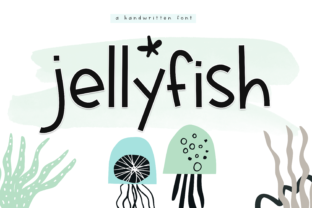
Jellyfish Display Font for Whimsical Web Design
Jellyfish is a fun and whimsical display font with a youthful charm, making it an ideal choice for digital creators seeking to inject personality into their online presence. As a web designer, I often look for typefaces that do more than just convey information; they need to set a tone, evoke emotion, and guide the user’s eye through a layout with intention. When working on projects that require a playful yet professional aesthetic, selecting the right display fonts can make or break the visual hierarchy of a page. Jellyfish offers a unique solution for designers who want to move away from sterile, corporate typography and embrace a more human, approachable digital identity.
Jellyfish for Youthful Brand Identity and Creative Portfolios
Jellyfish serves as a powerful tool for establishing a brand voice that feels energetic, modern, and unpretentious. In the realm of web design, first impressions are formed in milliseconds, and typography plays a critical role in that initial judgment. For creative portfolios, boutique agencies, or personal branding sites, using a distinctive creative font like Jellyfish helps differentiate your work from competitors who rely on standard system fonts. The font’s child-like spin brings a sense of authenticity and warmth, which is particularly effective for freelancers, illustrators, and small business owners who want to connect emotionally with their audience. By integrating this typeface into your hero sections or logo designs, you signal that your brand is innovative and open-minded, appealing directly to a demographic that values creativity and individuality over rigid tradition.
Jellyfish in Hero Sections and Landing Page Headers
Jellyfish excels in high-visibility areas where attention must be captured immediately. When designing landing pages for SaaS products, online courses, or digital templates, the hero section is the most real estate you have to communicate value. Using Jellyfish for main headlines allows you to create a strong visual anchor that draws users in. However, because it is a display font, it requires strategic placement to maintain readability. It works best when paired with a clean, neutral sans serif font for body copy, creating a balanced contrast between decorative flair and functional clarity. This pairing ensures that while the headline grabs attention with its whimsical character, the supporting text remains easy to scan, reducing bounce rates and keeping users engaged with your content. For example, a coaching website might use Jellyfish for the main value proposition statement, while a simple geometric sans serif handles the detailed service descriptions, resulting in a layout that feels both inviting and organized.
Jellyfish for E-commerce Banners and Promotional Graphics
Jellyfish is particularly effective in e-commerce environments where visual appeal drives conversion. Online store owners often struggle to make their product banners stand out amidst a sea of minimalist designs. Incorporating Jellyfish into sale announcements, seasonal promotions, or new arrival headers can add a layer of excitement that encourages clicks. The font’s youthful charm resonates well with fashion brands, toy stores, craft supplies, and lifestyle boutiques. When used on image overlays or dark backgrounds, the distinct shapes of the letters ensure they remain legible without needing excessive sizing. For mobile-responsive layouts, it is crucial to test how Jellyfish scales on smaller screens. While it may not be suitable for long paragraphs due to its decorative nature, it performs exceptionally well as a short phrase or button label, adding a touch of personality to call-to-action elements that might otherwise feel generic. This subtle shift in typography can enhance the perceived value of your digital products and increase user engagement.
Jellyfish for Digital Products and Course Sales Pages
Digital product creators, including educators and course developers, benefit significantly from the approachable nature of Jellyfish. When selling knowledge or skills, trust and relatability are key components of the sales process. A commercial font with a friendly demeanor helps demystify complex topics and makes the learning journey seem less intimidating. On a course sales page, using Jellyfish for subheadings or testimonial quotes can break up dense blocks of text and add visual rhythm to the page. It supports the narrative that education should be engaging and fun. Furthermore, for bloggers and content marketers, using this font in featured post graphics or newsletter headers can boost click-through rates by making the content appear fresh and lively. The versatility of Jellyfish allows it to adapt to various niches, from tech startups aiming for a quirky brand image to wellness coaches promoting a holistic and gentle approach to self-care.
Jellyfish Pairing Strategies for Modern Typography
Successful web design relies heavily on effective font pairing. Jellyfish, being a highly stylized display font, demands a complementary partner that provides stability and structure. A classic combination involves pairing it with a robust sans serif font like Helvetica, Inter, or Roboto for body text. This contrast highlights the whimsical characteristics of Jellyfish while ensuring that the majority of the content remains accessible and readable. For brands seeking a more editorial or sophisticated look, pairing Jellyfish with a modern serif font can create an interesting juxtaposition of old-world elegance and contemporary playfulness. This technique is often seen in lifestyle magazines or high-end boutique websites. Designers should pay close attention to weight and spacing when combining these fonts. Ensuring adequate line height and letter spacing prevents the decorative elements of Jellyfish from clashing with the structural needs of body copy. Additionally, checking the included styles and alternates within the font file can provide extra flexibility, allowing for variations in punctuation or special characters that enhance the overall design cohesion.
Jellyfish Licensing and Implementation for Web Projects
For professional web designers and digital product creators, understanding licensing is as important as selecting the right typeface. Jellyfish is designed for commercial use, but it is essential to review the specific terms regarding web embedding, client projects, and digital templates. Many premium fonts come with webfont licenses that allow for embedding via CSS, ensuring consistent rendering across different browsers and devices. When implementing Jellyfish on a website, consider performance optimization techniques such as subset loading to reduce file size and improve page load times. Fast-loading pages are crucial for SEO and user experience, so balancing aesthetic desires with technical efficiency is a key skill. Whether you are building a custom WordPress theme, designing a Shopify store, or creating a downloadable Canva template, ensuring you have the proper rights to use Jellyfish protects your business and respects the creator’s intellectual property. By investing in high-quality, properly licensed typography, you elevate the professionalism of your digital assets and contribute to a more trustworthy online ecosystem.